Download App

.svg)
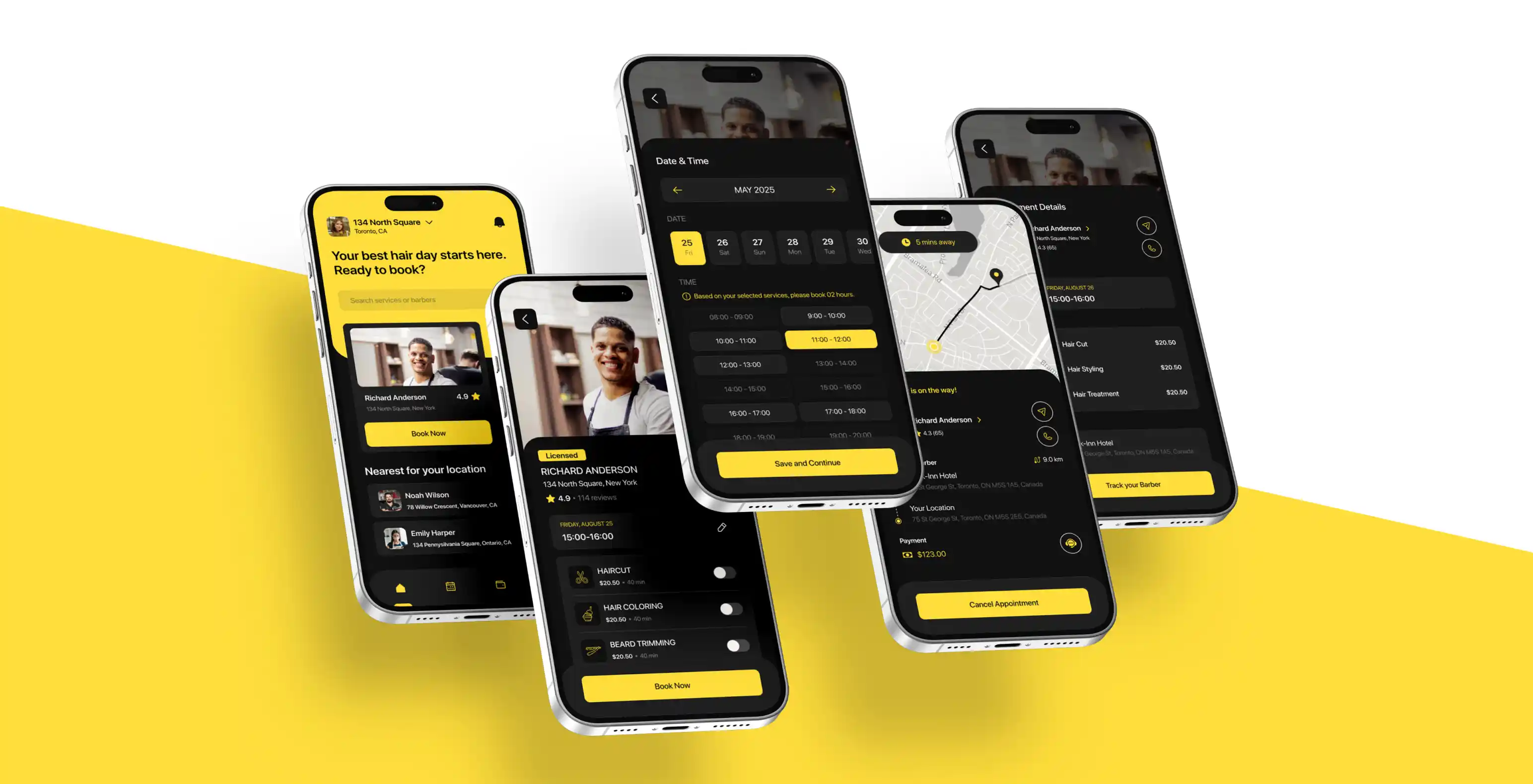
Finding a reliable mobile hairstylist used to mean endless social media searches, phone calls, and hoping someone was available. Cutsy simplifies this by bringing all mobile hair services into one platform accessible from your phone or computer.
This guide covers every feature from download to booking to managing favorites. Understanding these tools helps you book efficiently and get the results you expect.
Cutsy connects you with licensed mobile hair professionals in Alberta. The app handles browsing, booking, and payment all in one place.
Services include hair styling, hair trimming, and beard grooming for both men and women. You choose when and where you want service instead of adapting to salon hours. The app shows real-time availability, pricing, reviews, and portfolios for each professional.
Whether you're a busy professional, a parent managing schedules, someone with mobility challenges, or simply prefer at-home convenience, Cutsy removes booking friction while maintaining quality through its review system.
Cutsy is available for both iOS and Android without specific system requirements.
iOS users: Open the App Store, search "Cutsy," and tap "Get" to download.
Android users: Open Google Play Store, search "Cutsy," and tap "Install."
Download takes just a few minutes. Once installed, tap the Cutsy icon to begin setup.
Registration is mandatory to use Cutsy's features, ensuring secure transactions and maintaining your booking history.
When you first open the app, you'll create an account using three pieces of information: email address, phone number, and payment method.
Your email receives booking confirmations and receipts. Your phone number enables direct communication with stylists for appointment coordination. Payment information (credit or debit card) is stored securely for seamless transactions.
After entering your information, Cutsy sends a verification code to your email or phone. Enter this code to activate your account. This step protects against fraud and keeps the platform secure.
Once verified, add profile details like your preferred service location, hair type, and specific preferences to help stylists understand your needs.
Account Setup Checklist:
• Valid Email Address: Used for confirmations, receipts, and account recovery
• Active Phone Number: Required for stylist communication and verification
• Payment Method: Credit or debit card for secure in-app transactions
• Verification Completed: Confirm email or phone verification code
• Profile Information: Add service location and hair preferences
• Notification Preferences: Set up alerts for bookings and reminders
• Privacy Settings: Review and adjust data sharing preferences
• Terms Acceptance: Read and agree to platform terms and conditions
Finding the right stylist involves more than just picking the first available option. Cutsy provides several tools to help you match with professionals whose skills, experience, and availability align with your needs.
The main screen displays stylists currently available in your area. Each listing shows key information at a glance: the stylist's name, profile photo, rating, number of reviews, and starting price for services. You can scroll through these listings to get a sense of your options.
The filter feature narrows your search based on specific criteria. You can filter by service type if you're looking specifically for haircuts, styling, or beard trimming. Price range filters help you stay within budget, showing only stylists whose rates match your spending limits.
Availability filters are particularly useful when you need an appointment within a specific timeframe. You can search for stylists available today, this week, or on particular dates. The rating filter lets you focus on highly-rated professionals, typically those with 4.5 stars or higher.
Reviews provide insight into what you can expect from each stylist. Cutsy's review system allows previous clients to rate their experience and leave detailed feedback. Look for patterns in reviews consistent mentions of punctuality, skill level, or communication style tell you more than a single comment.
Pay attention to reviews from clients with similar needs to yours. If you have thick, curly hair, reviews from other clients with that hair type are more relevant than general feedback. Recent reviews matter more than older ones, as they reflect the stylist's current service quality.
Each stylist maintains a portfolio showcasing their work. These photos demonstrate their technical skills and style range. Look for examples similar to what you want if you're considering a fade haircut, check whether their portfolio includes quality fade work.
Portfolios also reveal a stylist's aesthetic preferences. Some lean toward classic, conservative styles while others specialize in modern, trendy cuts. Matching your style preference with their demonstrated work increases the likelihood of satisfaction.
Stylist profiles contain additional details beyond reviews and portfolios. You'll find information about their experience, training, certifications, and specialties. Some stylists mention particular expertise with certain hair types, lengths, or techniques. This context helps you assess whether they're equipped to handle your specific needs.
The messaging feature enables direct communication between you and stylists, both before and after booking appointments. This functionality addresses questions, clarifies service details, and ensures both parties have aligned expectations.
You can initiate conversations with stylists before committing to a booking. This is valuable when you have specific questions about their services, availability outside listed times, or want to discuss particular styling needs. For example, if you're considering a significant style change, messaging beforehand lets you gauge whether the stylist is comfortable with your request.
Use pre-booking messages to share reference photos, explain hair texture or challenges, or ask about product recommendations. Stylists can assess whether they're the right fit for your needs and provide honest feedback about what's achievable.
After booking, the messaging feature becomes your primary communication channel for appointment coordination. Stylists typically send messages confirming the appointment and may ask clarifying questions about your location, parking availability, or specific service details.
You can use post-booking messages to adjust minor details, provide access instructions for your building, or update the stylist if your schedule changes. This direct line ensures smooth coordination on appointment day.
Cutsy maintains your conversation history with each stylist. You can reference previous discussions, review the details you shared, or continue conversations across multiple bookings. This history proves useful when rebooking the same stylist, as they can reference your past preferences and requests.
Appointment management features help you stay organized and ensure you never miss a scheduled service. Cutsy includes several tools specifically designed for tracking and managing your bookings.
The calendar feature provides a visual representation of all your upcoming appointments. You can view appointments by day, week, or month, making it easy to see how hair services fit into your broader schedule. Each appointment displays essential information: stylist name, service type, date, time, and location.
The appointments section lists all confirmed bookings chronologically. Tapping any appointment reveals full details: the stylist's profile, exact services booked, total cost, location address, and appointment time. You can access this information anytime, eliminating the need to search through emails or messages for booking details.
Reminders help ensure you're prepared for upcoming appointments. Cutsy sends automatic notifications at set intervals before your appointment. You can customize when you receive these reminders based on your preferences.
The app sends various types of notifications related to your bookings and account activity. You control which notifications you receive through the settings menu. Customization options let you enable or disable specific notification types based on what you find helpful versus intrusive.
Established fact that a reader will be distracted by the readable content of a page when looking at its layout. The point of using Lorem Ipsum is that it has a more-or-less normal distribution of letters, as opposed to using content here.
Once you've experienced a service through Cutsy, the app offers features that simplify future bookings, particularly when you want to work with the same stylist again.
When you find a stylist whose work you appreciate, you can save them as a favorite. The favorites feature creates a shortlist of preferred professionals accessible from your profile. Instead of searching through all available stylists, you can go directly to your favorites and check their availability.
This feature is particularly valuable if you maintain a regular grooming schedule. Rather than browsing and vetting stylists each time, you can quickly book with someone you trust.
The rebooking feature streamlines scheduling repeat appointments. When viewing your booking history, you'll see a "Book Again" option next to completed appointments. Tapping this copies the previous appointment details, same stylist, same services allowing you to simply select a new date and time.
This eliminates the need to manually select services, enter location details, or search for the stylist again. The entire rebooking process takes seconds instead of minutes.
Your booking history provides a complete record of all past appointments through Cutsy. This record includes dates, stylists, services received, and amounts paid. Booking history serves multiple purposes: tracking grooming frequency, comparing different stylists you've tried, and maintaining records for personal budgeting.
You can also access receipts for any past appointment through the history section, useful for expense tracking or reimbursement purposes.
Managing payments and handling schedule changes are essential aspects of booking services. Cutsy includes features that make both processes straightforward and transparent.
Cutsy processes payments digitally through the platform. The app accepts major credit and debit cards, which you securely store in your account during setup. This payment structure means you don't need to handle cash or card transactions during the actual appointment.
Payment security is handled through encrypted processing systems. Your financial information remains protected and isn't shared directly with stylists. After your appointment completes, the platform automatically processes payment based on the agreed-upon service cost. You receive a digital receipt via email and within the app.
Life changes, and Cutsy accommodates schedule adjustments. To reschedule an appointment, navigate to your upcoming bookings and select the appointment you need to change. The rescheduling option lets you choose a new date and time from the stylist's available slots.
The stylist receives notification of the change and confirms the new time. This process happens within the app without requiring phone calls or external coordination.
Understanding cancellation terms prevents surprises if you need to cancel an appointment. Cutsy allows you to cancel appointments through the app, though it's important to note that cancellations should be made as early as possible out of respect for the stylist's schedule.
Review the specific cancellation terms before booking, as timing expectations may vary. The policy is displayed during the booking process and in your appointment details.
Payment and Scheduling Management:
• Accepted Payment Types: Major credit cards and debit cards through secure processing
• Payment Timing: Automatic processing after appointment completion
• Digital Receipts: Emailed and stored in-app for record keeping
• Rescheduling Window: Available through the app with stylist confirmation required
• Cancellation Process: Cancel appointments through the app interface
• Tipping Option: Add gratuity through the app after service completion
• Price Transparency: All costs displayed upfront before booking confirmation
Even with an intuitive app, questions or issues occasionally arise. Cutsy provides support resources to help you resolve problems and get assistance when needed.
The help section is accessible from the main menu or settings. You can submit support requests directly through the app, describing your issue or question. Support staff typically respond within the timeframe specified in the app, addressing concerns about bookings, payments, technical issues, or general questions.
Before contacting support, you can check the FAQ section for answers to common questions. This resource covers topics like account setup, booking procedures, payment processing, and troubleshooting. Many questions are answered immediately through these self-service resources.
When you submit a support request, the app creates a ticket and notifies you of its receipt. The support team reviews your concern and responds with solutions or asks for additional information if needed. For urgent issues related to same-day appointments, priority support options may be available.
The messaging system maintains a record of your support conversations, allowing you to reference previous interactions if needed.
Understanding Cutsy's features transforms the app from a simple booking tool into a comprehensive grooming management platform. The combination of browsing tools, communication features, and appointment management capabilities gives you control over when, where, and how you receive hair services.
Start by creating a complete profile that accurately reflects your preferences and needs. Take time to explore stylist portfolios and read reviews thoroughly before your first booking. Use the messaging feature to establish clear communication with stylists about your expectations.
As you use the app more frequently, leverage features like favorites and quick rebooking to streamline the process. Customize your notification settings to match your preferences, keeping you informed without overwhelming you with alerts.
The platform works best when you engage with its features actively leaving reviews helps other users make decisions, while your feedback helps stylists improve their services. Maintaining updated payment information and contact details ensures smooth booking experiences every time.
Mobile hair services through Cutsy offer convenience, but the app's features determine how effectively you can access that convenience. By understanding and utilizing these tools, you turn a simple appointment into an optimized experience tailored to your specific needs and schedule.
1. Is the Cutsy app free to download?
Yes, the Cutsy app is completely free to download on both iOS and Android devices. You only pay for the hair services you book through the platform.
2. What payment methods does Cutsy accept?
Cutsy accepts major credit and debit cards, which are securely stored in your account. Payment is automatically processed after your appointment is completed, and you'll receive a digital receipt via email and in the app.
3. Can I message a stylist before booking an appointment?
Yes, Cutsy's messaging feature allows you to communicate with stylists before booking. This is helpful for discussing specific styling needs, sharing reference photos, asking questions about their services, or clarifying availability.
4. How do I reschedule or cancel an appointment?
To reschedule, navigate to your upcoming bookings, select the appointment you need to change, and choose a new date and time from the stylist's available slots. For cancellations, you can cancel through the app interface, though you should do so as early as possible out of respect for the stylist's schedule.
5. What services are available through Cutsy?
Cutsy offers hair styling, hair trimming, and beard grooming services for both men and women. Services are provided at your preferred location rather than at a salon.
6. How do I know if a stylist is qualified?
All stylists on Cutsy are licensed mobile hair professionals. You can view each stylist's profile to see their experience, training, certifications, specialties, portfolio of work, and reviews from previous clients.